Most survey errors are cheap to fix on the day they happen and expensive a month later. A misread question, a form that records the wrong area, a missed visit: each can be put right with one phone call while the team is still in the field. Automated data quality checks make that possible every day, not just when someone finds time. This post explains how such checks work and how to build them with n8n, then shows a real case: the checks we built for a multi-round field study run by CEGER in Uganda, and what they caught.
Why manual back-checks fall short
Field studies have always been checked by people. Supervisors shadow enumerators, spot-check forms and re-interview a share of respondents. Those checks matter and should stay. But they have three weaknesses.
They are slow. A back-check visit may happen days after the interview, when the enumerator has moved on and memories have faded.
They are partial. A supervisor sees a sample, not every record.
They depend on manual steps that break quietly. Scores are copied between spreadsheets, rosters are pasted into several files, and scripts are edited by hand for each new round. Every step is a chance for a silent error.
How automated data quality checks work
The idea is simple: write down what “good data” means for your study, and let a scheduled workflow test every record against those rules overnight. n8n is a workflow tool that connects data sources, runs code and sends messages on a schedule, which makes it a good fit. A typical setup has four steps.
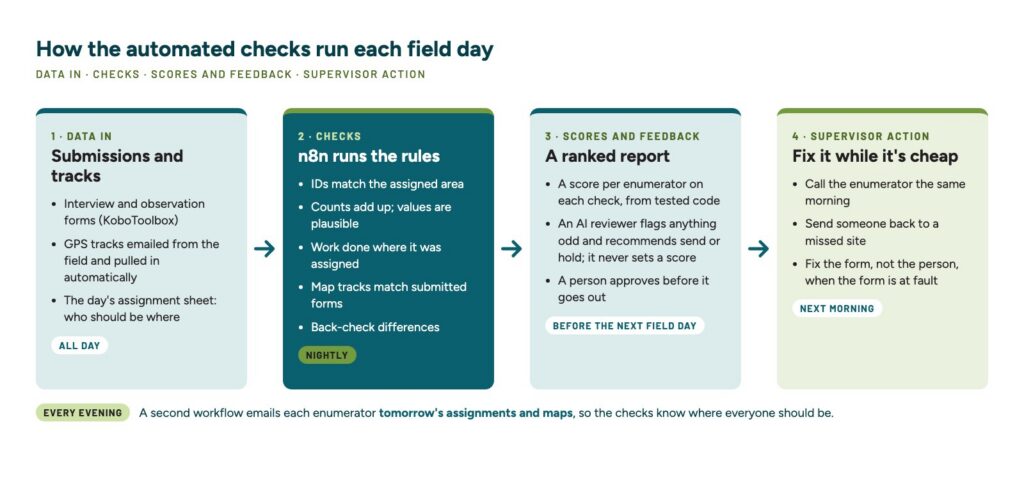
1. Collect the day’s data. The workflow pulls the day’s submissions from your survey platform (KoboToolbox, ODK, SurveyCTO or Google Forms), along with any GPS tracks and the assignment sheet that says who should be where. Knowing the plan lets the checks test coverage, not just what was submitted.
2. Run the rules. Code tests every record. Common rules are:
- required fields are filled and identifiers match the place they name;
- counts add up and values fall within plausible limits;
- work was done where it was assigned;
- GPS tracks and submitted forms match each other;
- answers agree with a supervisor’s back-check.
3. Score and review. Each rule becomes a score per enumerator, combined into a short report. Tested code computes every number. Some teams also add an AI reviewer to scan the report for anything unusual; it is optional, and it should flag, never compute.
4. Act the next morning. The report lands in a supervisor’s inbox before the next field day, so problems are fixed with a phone call, not a return trip a month later.
A real use case: CEGER’s multi-round field study
The Centre for Governance and Environmental Research (CEGER), a Uganda-based research firm, runs a multi-round field experiment in Uganda, with seven survey rounds between 2025 and 2027. Each round combines interviews, site observations and GPS-tracked walks, collected by a team of about a dozen enumerators. We built the automations for CEGER, in the same way we built TraceWalk and ACSGuide for field teams.
The starting point. Before the automations, quality scores were assembled by hand. The scoring scripts had to be edited in ten places for each new round, the field team’s roster was pasted into five files, and one score was typed into a spreadsheet by hand, with no check before the report was emailed.
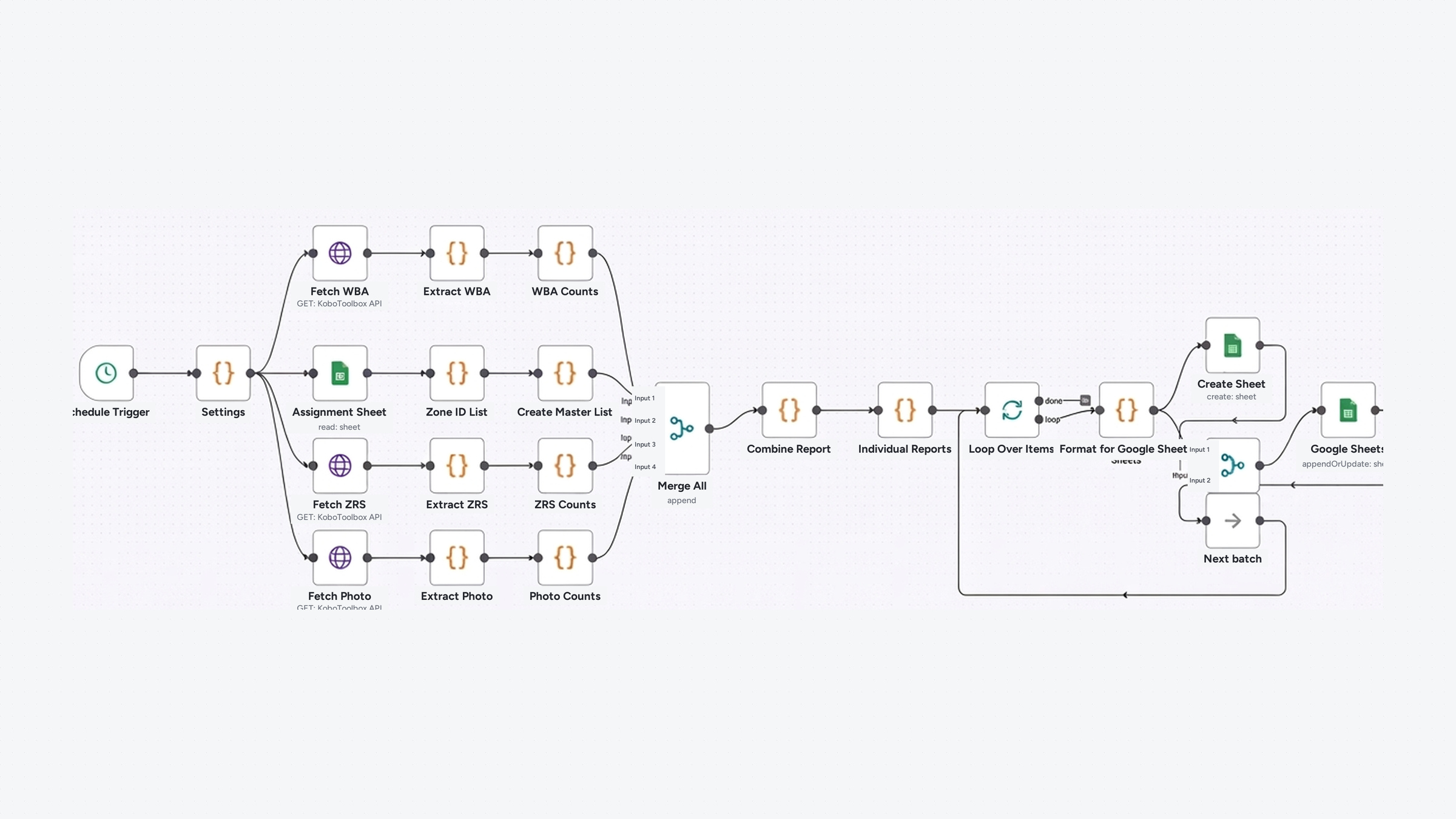
What we built. Two n8n workflows run around each field day. Every evening, one emails each enumerator the next day’s areas, with a map file of where to go. Every night, a second pulls the day’s forms from KoboToolbox, collects the GPS tracks the team emails in, reads the assignment sheet and runs the checks. In the latest round, enumerators were scored on eleven areas of quality. Coverage is measured against the assignment, so skipping hard work cannot raise anyone’s score. The results go out by email the same night.
The scoring code was tested hard before fieldwork. The scores from n8n and from a separate Python version matched exactly on the same data, and dry runs on sample and empty data were part of the testing. We test, review the output and refine the checks in cycles: each round’s lessons go into the next, which is how the checks grew to eleven quality areas.
What the checks caught. The real value of automated data quality checks showed up in problems that would have stayed hidden until analysis:
- A form fault on day one. Records from one area kept arriving under another area’s code. The checks flagged it on the first workday. The cause was a swapped label in the survey form, not the enumerator, so the form was fixed and nobody was blamed.
- Missed revisits, closed in days. The round had to revisit 1,148 sites from the previous round. Tracing cut the number unaccounted for from 99 to 31 without extra fieldwork, and the rest were completed. All 1,148 were accounted for before the round closed.
- Work outside assigned areas. 15 records were flagged as filed outside their enumerator’s areas. Two had innocent explanations; the others went to supervisors to resolve.
- Fixes without a return trip. In data cleaning, GPS evidence moved 10 interviews to their correct area without sending anyone back. Across five earlier rounds, 449 of 23,221 rows (1.9%) were corrected.
How to start with automated data quality checks
You do not need to automate everything at once. A sensible first set of automated data quality checks looks like this:
- Write the rules before fieldwork. List what “good” means for your study: required fields, plausible ranges, expected counts per day, where each person should be. The World Bank’s guide to high-frequency checks is a good checklist.
- Start with three checks. Completeness, location and duplicates catch most problems. Add more once these run reliably.
- Send results to a person, not a dashboard. A short report in a supervisor’s inbox each morning gets read. A dashboard often does not.
- Score fairly and explain the score. Enumerators accept scores they can understand. Measure against what each person was assigned, and say when a fault lies with the form.
- Test with fake data first. Run the whole flow on made-up and empty data before day one.
- Keep people in charge. Let code compute, and have a person review what reaches the field team. If you add an AI reviewer, let it flag oddities, never decide.
These checks build on the habits in our post on field data quality. Our automated data-quality service, FieldPulse, runs similar checks nightly on data from KoboToolbox, ODK, SurveyCTO or Google Forms.
Build it into your next study
If you run surveys or field experiments in Uganda or the region, we can design the checks with your team, build the workflows and keep them running through fieldwork. See our software development services, data management and analysis and field research services, or get in touch.